Download SecurityQFill for macOS
A free, local, tabbed CLI that scans a repo you point it at with real deterministic tools — Gitleaks (secrets), Trivy (infrastructure misconfig and dependency vulnerabilities), and GitHub's own branch-protection API (change management) — and uses a local LLM (Ollama, running on your own machine) only to map those already-found, cited facts into a CAIQ v4.0 Lite questionnaire subset. It opens a live-updating browser tab so you watch each check run against your own code. Nothing about your repo or its contents is ever uploaded anywhere.
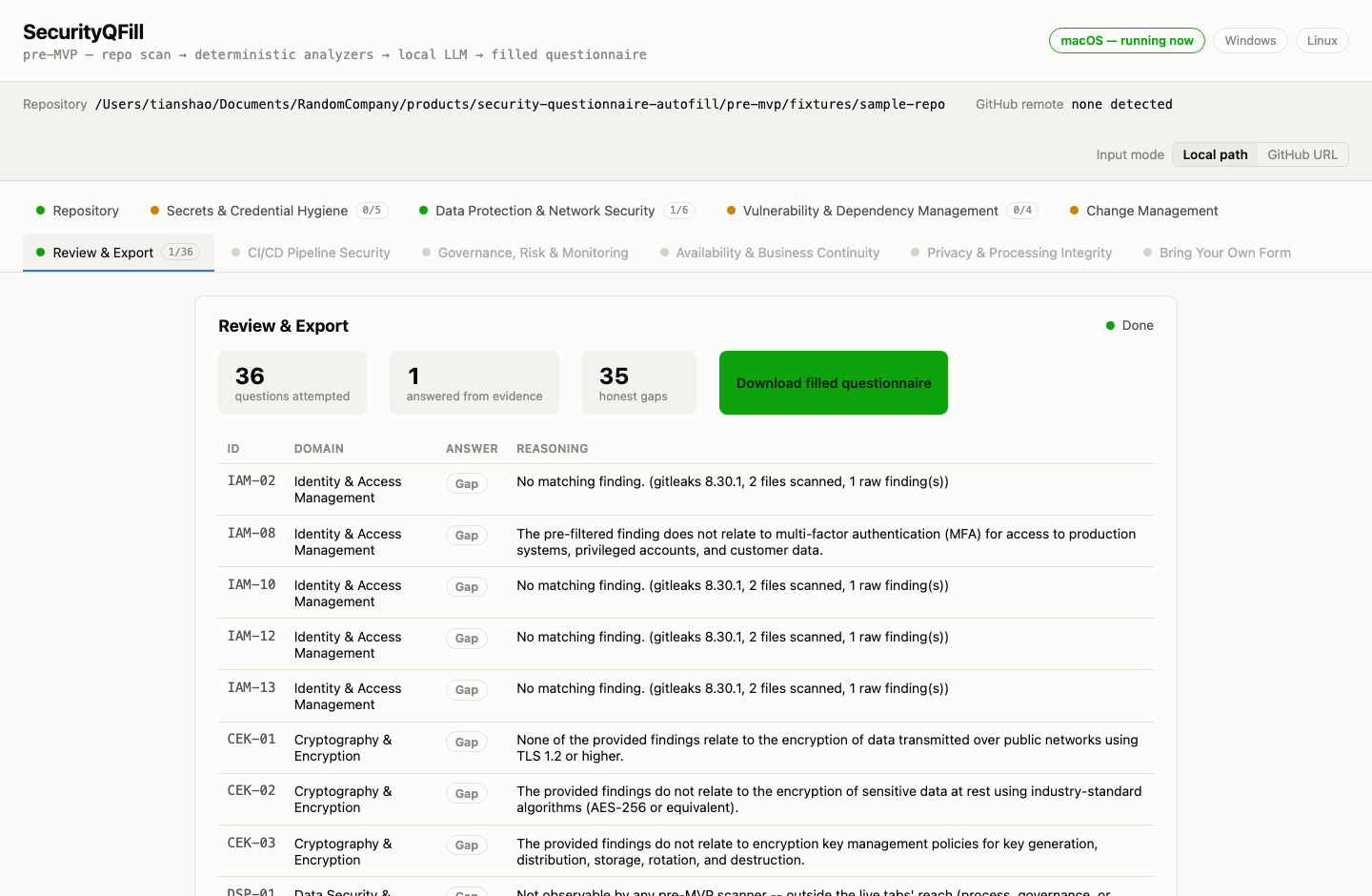
Real, unedited output from an actual local run — this is what you get: every CAIQ v4.0 Lite question attempted, cited when a scanner supports the answer, honestly marked Gap when nothing does.
Honest status: this is a free pre-MVP, and it's a real, working macOS
.app — not a stub. It hasn't been through Apple's separate, paid
notarization process, so macOS will block the very first launch until you approve it
once. That's expected, it's a one-time step, and the exact clicks are spelled out
below.
Download
Requires macOS on Apple silicon. Gitleaks and Trivy are bundled into the download
for you — nothing to separately install for those. The one thing you do need
to install yourself first is Ollama,
running locally, with the qwen2.5:7b model pulled
(ollama pull qwen2.5:7b) — that’s a real ~4.7GB one-time download,
so plan for the time and disk space. The CLI detects and tells you plainly if Ollama isn’t
running rather than failing silently or making anything up.
First launch: approving it once
The app is ad-hoc code-signed — free, with no Apple Developer Program purchase involved. macOS can verify the app hasn't been tampered with, but can't tie it to a paid developer identity, so Gatekeeper blocks the first launch. Here's how to allow it:
- macOS 15 (Sequoia) and later: double-click the app and let macOS refuse it. Then open System Settings → Privacy & Security, scroll down to the Security section, and click Open Anyway next to SecurityQFill. Apple removed the older right-click shortcut in Sequoia, so this is now the only route.
- macOS 14 (Sonoma) and earlier: right-click the app, choose Open, and confirm at the prompt.
Either way it's once per install, not every launch. If you'd rather read the code than trust a binary, reply to the email and we'll send you the source directly.
What's actually live in this pre-MVP
- Secrets & Credential Hygiene — real Gitleaks scan
- Data Protection & Network Security — real Trivy misconfig scan
- Vulnerability & Dependency Management — real Trivy dependency scan
- Change Management — real GitHub branch-protection check (only if you supply a token)
- Review & Export — all 36 CAIQ v4.0 Lite questions, every answer cited to a real finding or marked an honest gap
Visible in the tab bar, but intentionally not live this round (styled and inert, not hidden):
- CI/CD Pipeline Security, Governance/Risk/Monitoring, Availability & Business Continuity, Privacy & Processing Integrity, Bring Your Own Form — each is greyed with a plain-language reason for why (mostly: no automated scanner can honestly answer a process/policy question)
Want to hear when a real hosted download exists? Get early access →