Free — Early Access

Trust, not AI.

A free local CLI that fills your security questionnaire with facts, not guesses.

Download SecurityQFill, point it at a repo on your own machine, and watch real deterministic scanners — Gitleaks, Trivy, and GitHub’s own branch-protection API — find your actual security facts. A local LLM (Ollama, running entirely on your machine) only maps those already-cited findings into a CAIQ v4.0 Lite questionnaire — it never invents an answer, and it never leaves your machine to do it.

↓ Download for macOS Windows Linux

Free, pre-MVP, macOS only. No signup required to build and run it, no API key, no account — the only thing you install separately is Ollama (Gitleaks and Trivy ship bundled inside the app). See exactly what to expect on the download page before you get it.

A real scan, running — not a mockup
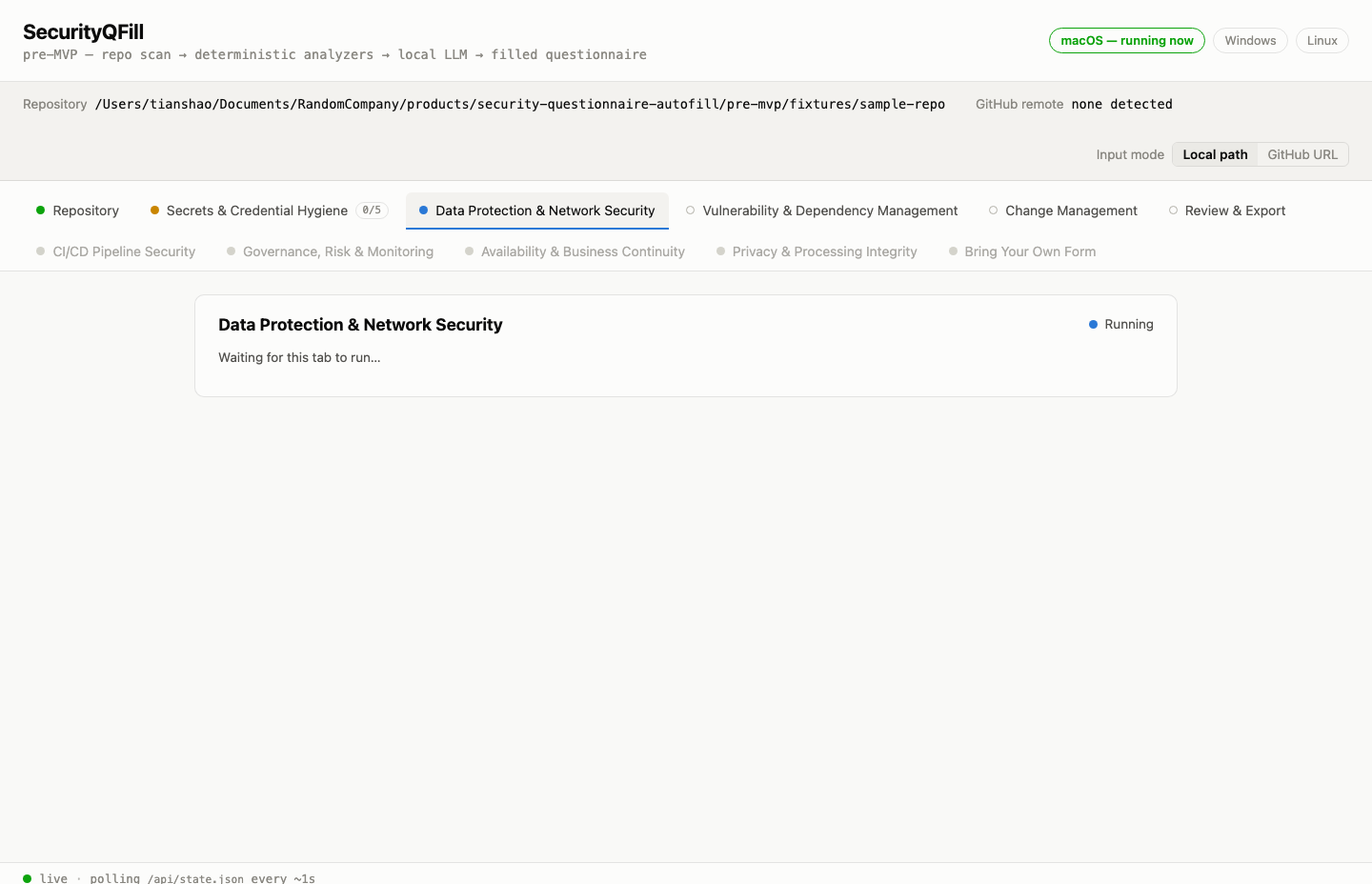
SecurityQFill's live browser tab mid-scan: the Data Protection & Network Security tab shows a blue "Running" status while Secrets & Credential Hygiene has already finished, with several "coming soon" tabs visibly greyed out below

A real, unedited screenshot — the local browser tab that auto-opens when you run SecurityQFill, caught mid-scan against this repo’s own test fixture. Live tabs run real analyzers; greyed tabs are shown honestly as “coming soon,” not hidden.

A security questionnaire is a trust document, and a wrong answer is a liability. Most pre-SOC2 founders answer them one of two bad ways: burn a weekend cross-referencing policy docs by hand, or paste the questions into ChatGPT and ship whatever confident-sounding “yes” it invents. That second path is worse than slow — a fabricated “yes” to a control you don’t have is a misrepresentation to enterprise procurement. SecurityQFill exists so you can answer honestly, quickly, and from evidence — deterministic tools find the facts, a local model only writes them up, and everything runs on your own machine.
Join the early access list

The macOS CLI is free and downloadable right now — no signup required to build and run it. Sign up here if you’d rather we email you when there’s a hosted one-click download, Windows/Linux support, or new live analyzer tabs. No credit card, ever — there’s no pricing yet.

How it works

Four steps from a local repo to an honestly-filled questionnaire — watched live in your browser, nothing hidden.

1

Point it at a repo on your machine

Download, double-click, and give the CLI a local path — no GitHub OAuth, no cloning through us, no upload. It auto-opens a live browser tab so you can watch every step happen in real time. A GitHub-URL input mode is visible but greyed “coming soon” — local path only, this round.

2

Real scanners find the facts

Gitleaks checks for hardcoded secrets, Trivy checks infrastructure-as-code for misconfig and dependency manifests for known CVEs, and GitHub’s own branch-protection API checks change-management controls (one consent-gated network call, only if you opt in). These are mature, deterministic, independently-auditable tools — not the LLM guessing at your code.

3

A local LLM maps findings to answers

Ollama, running entirely on your machine, reads only the scanners’ own structured findings — never your raw source — and maps already-cited facts onto the matching CAIQ v4.0 Lite question. If nothing a scanner found actually supports an answer, the question is left an honest Gap, not a guess.

4

Review, then export

The Review & Export tab shows all 36 curated CAIQ v4.0 Lite questions: each one either answered with a citation back to the exact finding, or marked Gap with the honest reason why no scanner could answer it. Download the filled questionnaire as a Markdown file.

Repository (input) and five analyzer tabs are live this round: Secrets & Credential Hygiene, Data Protection & Network Security, Vulnerability & Dependency Management, Change Management, and Review & Export. Several more real SOC 2/CAIQ control categories — CI/CD Pipeline Security, Governance/Risk/Monitoring, Availability & Business Continuity, Privacy & Processing Integrity, Bring Your Own Form — are visible in the tab bar, styled, and honestly marked “coming soon,” not hidden. Most of them are process/policy questions no scanner can ever observe, which is exactly why they’re greyed instead of guessed at.

It refuses to make up answers

This is the whole point. Every answer is grounded in a real, cited scanner finding, or it’s flagged as an honest gap. No confident fabrications — and no cherry-picked example, either. This is the actual output of a real run.

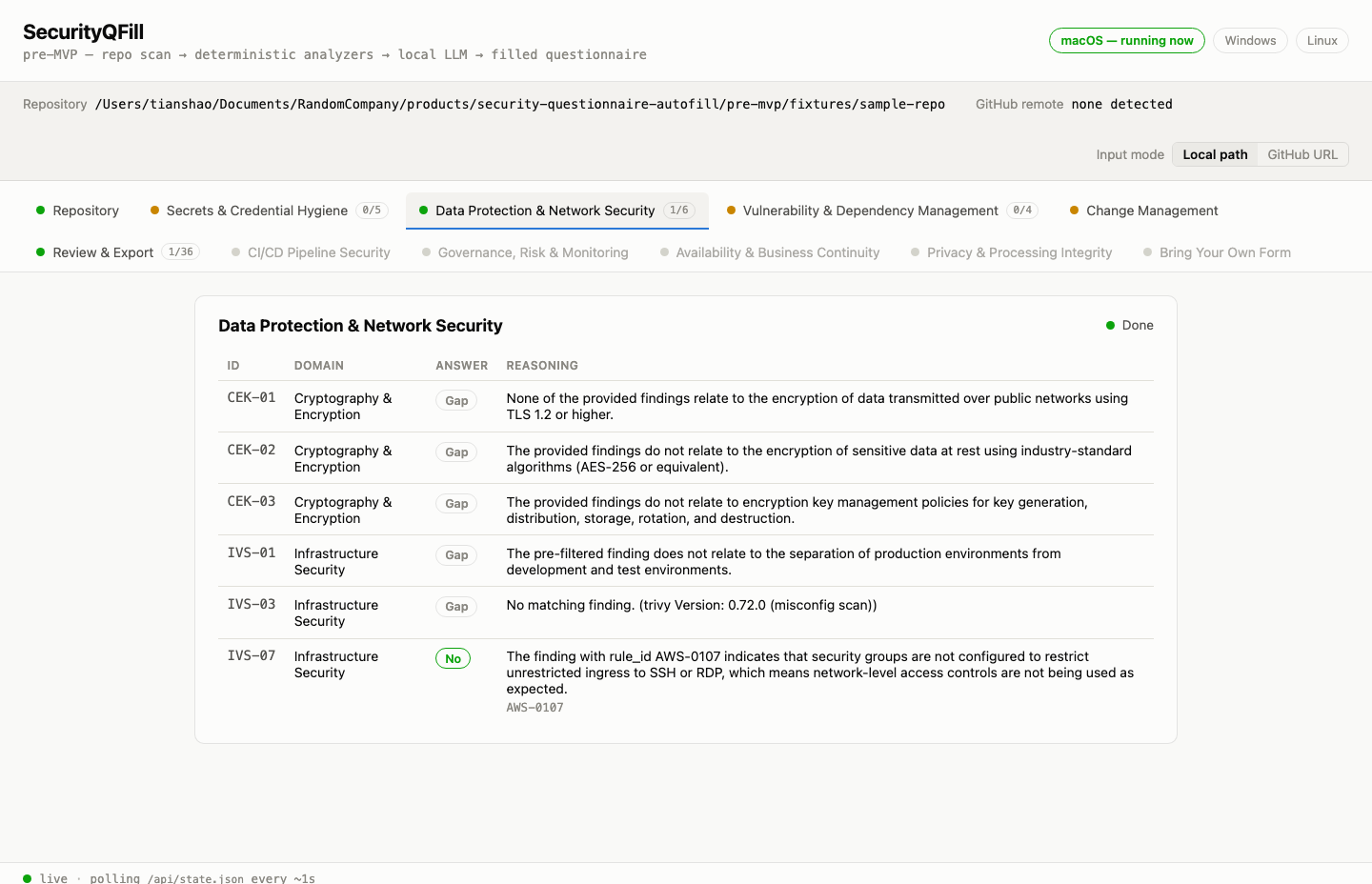
SecurityQFill's Data Protection & Network Security tab, real output: five questions marked Gap with an honest reason each, and one question (IVS-07) answered "No" with a citation to real Trivy finding AWS-0107 about an open SSH ingress rule

Real output, this exact tab, unedited. Five of six questions in this domain are honestly marked Gap — no matching finding, or the finding that did match doesn’t actually support an answer. The one question it does answer (IVS-07) cites the exact Trivy finding (AWS-0107) it came from. A tool that answers “Gap” more often than “Yes” on a deliberately-flawed test fixture is doing its job — that’s the trust story, not a shortfall.

What makes it different

Not another AI answer generator. A verification engine that’s honest about what it can and can’t prove.

🔍
Real tools find the facts, not the LLM

Gitleaks, Trivy, and GitHub’s branch-protection API do all of the actual finding — mature, deterministic, independently-auditable tools that predate LLMs. The model never scans your code; it only reads their structured output.

Grounded-only, never invented

The local LLM’s one job is mapping an already-found, already-cited finding onto the matching question. No answer is generated without a real source to point to — never a confident “yes” to a control that isn’t actually there.

📋
Every gap says why

When no scanner can answer a question, you get the honest reason — “no matching finding” for a clean scan, or “not observable by any pre-MVP scanner” for a process/policy question no code scanner could ever answer. Never silence, never a guess.

🔐
100% local — there is no server

Not BYOK, not “your key, our servers” — there is no server in the normal flow at all. The scan, the LLM call, and the questionnaire all run on your machine, bound to 127.0.0.1 only. The one exception is Change Management’s single, consent-gated call to GitHub’s own API — disclosed before it happens, skippable entirely.

The assembled result — Review & Export, real output

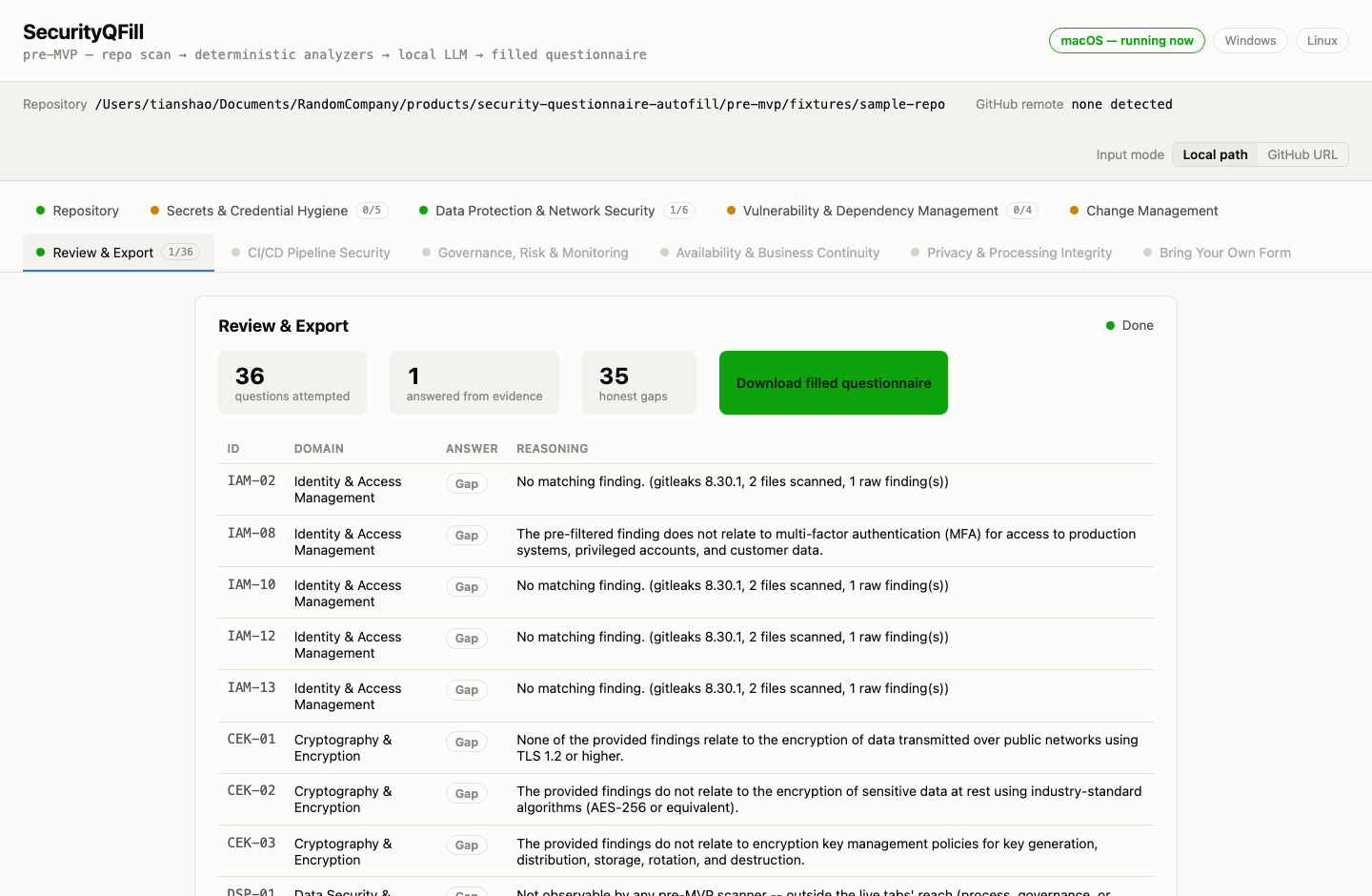
SecurityQFill's Review & Export tab, real output: 36 questions attempted, 1 answered from evidence, 35 honest gaps, a green "Download filled questionnaire" button, and a table of every question's ID, domain, answer, and reasoning

All 36 curated CAIQ v4.0 Lite questions, every one attempted, real output from the same run as above — not a curated highlight reel. On this deliberately-flawed test fixture, most questions land as honest gaps; that’s the product being honest about what a code/infra scan can and can’t prove, not a weak result.

🔒

There’s no server. Full stop.

This isn’t “your key, our servers” — in normal operation, no RandomCompany server is involved anywhere in the pipeline. You download a real macOS app; it runs Gitleaks and Trivy as local subprocesses against the repo path you give it, calls your own local Ollama instance at 127.0.0.1:11434, and serves its live browser UI on 127.0.0.1 only — never reachable from your network, let alone the internet.

The one exception, and it’s disclosed before it happens: if you run the Change Management tab, it makes a single authenticated call to GitHub’s own API (not ours) to read your repo’s branch-protection settings, using a token you supply yourself. Skip that tab and even that one call never happens.

We’re the team behind SecurityQFill. We’ve spent years building and selling B2B software, and we kept running into the same wall: enterprise deals stalling because of security questionnaires.

The problem isn’t just repetition — it’s honesty under pressure. A blank questionnaire loses the deal; a fabricated one is a liability. The right answer is to verify what’s actually true from your own code and infrastructure, answer from that, and be honest about the gaps with a plan to close them. That’s the product we’re building.

We’re validating before we build. If you’ve ever lost time — or sleep — to a vendor security questionnaire, we’d love to hear about it.

tyrelltle@gmail.com

FAQ

What do I need installed before I download?

macOS only for this pre-MVP. You need Ollama installed and running, with the qwen2.5:7b model pulled (ollama pull qwen2.5:7b) — that’s a real ~4.7GB one-time download, so budget the time and disk space for it. Gitleaks and Trivy ship bundled inside the app — nothing extra to install for those. The CLI detects and tells you plainly if Ollama isn’t running rather than failing silently. Full detail on the download page.

What LLM does this use?

A local model — qwen2.5:7b — running entirely on your own machine via Ollama. There’s no API key, no account, and no hosted AI provider anywhere in this pipeline. Nothing about your code or the scanners’ findings is ever sent to us or to Anthropic, OpenAI, or anyone else.

What does “grounded-only” mean?

The local LLM only ever maps a fact a deterministic scanner already found and cited onto the matching question — it never scans your code itself, and it never answers without a real finding to point to. When nothing supports an answer, the question is left an honest Gap. That refusal is the feature, not a limitation.

Why does it mark so many questions as Gap?

Because most of a real questionnaire genuinely can’t be answered by scanning code — MFA enforcement, formal access-review cadence, incident response process, and similar questions are policy/process facts, not something in your repo. SecurityQFill says so honestly instead of guessing. See the real screenshot above — five honest gaps and one grounded citation, from an actual run.

How is this different from just using ChatGPT?

ChatGPT (or any hosted LLM) will generate a plausible-sounding answer with no real finding behind it. SecurityQFill’s LLM never gets to see your raw code at all — only Gitleaks/Trivy/GitHub API’s own structured findings — and it refuses to answer anything those tools didn’t actually find, citing the exact finding for every answer it does give.

Is my source code safe?

Yes — it never leaves your machine. Gitleaks and Trivy run as local subprocesses against the local path you give the CLI; nothing is uploaded, cloned to a remote service, or sent to us. The one exception is the Change Management tab’s single, consent-gated call directly to GitHub’s own branch-protection API (not ours), which only runs if you opt in and supply your own token.

What questionnaire does it fill?

A curated 36-question subset of the Cloud Security Alliance’s CAIQ v4.0 Lite — the real questionnaire standard enterprise buyers actually send (the official CSA artifact is 124–138 questions across 17 domains; sourcing the full set is on the roadmap, not built yet). Every question gets an attempted answer or an honest gap; download the result as a Markdown file from the Review & Export tab.

Does it work on Windows or Linux?

Not yet. Windows and Linux are shown as “coming soon” in the download options — visible, not hidden, but zero functionality behind them this round. macOS only for this pre-MVP.

Is this free?

Yes. This is a free, early-access pre-MVP — no credit card, no pricing, no account required to download and run it. We’re validating real usage before deciding what (if anything) a future paid product looks like.

Answer honestly. Win the deal anyway.

The macOS CLI is free to download and run right now. Join the early access list if you’d rather we email you first — new platforms and live analyzer tabs are on the way.

No credit card, ever — there’s no pricing yet. Unsubscribe anytime.